The Events Calendar
Divi Events Calendar
- While on the Calendar page, enable the Visual Builder
- Click on the + to add a module

- Select the ‘Events Calendar’ module

Styling the Divi Calendar in the ‘Events Calendar’ module

- The ‘Content’ tab: The default settings typically do not need to be changed
- The ‘Design’ tab: All, or at least the bulk of the styling happens here
- The ‘Advanced’ tab: The default settings typically do not need to be changed

Styles in the ‘Design’ tab
| Toggle Group |
Infrequent Style Items |
Frequent Style Items |
Comments |
|---|---|---|---|
| Heading Text |
|
|
 |
| Days of the Week |
|
|
 |
| Calendar Days |
|
|
* Dates only Default for Other Months is reduced opacity  |
| Events |
|
|
 |
| Thumbnails in Calendar Days |
|
||
| Navigation Buttons |
|
|
 * edit hover  |
| View Buttons |
|
|
 * edit hover |
| Tooltip |
|
|
* Border around Event Details Can’t view in Visual Builder  |
| Details Image |
|
Can’t view in Visual Builder |
|
| Details Labels Text |
|
Can’t view in Visual Builder |
|
| Details Title Text |
|
|
Can’t view in Visual Builder  |
| Details Text |
|
|
Can’t view in Visual Builder ——————– * Detail Text/Icon  |
| Details Excerpt Text |
|
|
Can’t view in Visual Builder |
| Sizing |
|
Defaults are set to ‘auto’ |
|
| Spacing |
|
||
| Border |
|
Border around all components |
|
| Box Shadow |
|
||
| Filters |
|
||
| Transform |
|
||
| Animation |
|
Divi Events Calendar | ADA Checklist
- While on the Calendar page, enable the Visual Builder
- Click on the + to add a module
- Select the ‘Events Calendar’ module
Styling the Divi Calendar in the ‘Events Calendar’ module
- The ‘Content’ tab: The default settings typically do not need to be changed
- The ‘Design’ tab: All, or at least the bulk of the styling happens here
- The ‘Advanced’ tab: The default settings typically do not need to be changed
Styles in the ‘Design’ tab
| Toggle Group |
Infrequent Style Items |
Frequent Style Items |
Comments |
|---|---|---|---|
| Heading Text |
|
|
|
| Days of the Week |
|
|
|
| Calendar Days |
|
|
* Dates only Default for Other Months is reduced opacity |
| Events |
|
|
|
| Thumbnails in Calendar Days |
|
||
| Navigation Buttons |
|
|
* edit hover |
| View Buttons |
|
|
* edit hover |
| Tooltip |
|
|
* Border around Event Details Can’t view in Visual Builder |
| Details Image |
|
Can’t view in Visual Builder |
|
| Details Labels Text |
|
Can’t view in Visual Builder |
|
| Details Title Text |
|
|
Can’t view in Visual Builder |
| Details Text |
|
|
Can’t view in Visual Builder ——————– * Detail Text/Icon |
| Details Excerpt Text |
|
|
Can’t view in Visual Builder |
| Sizing |
|
Defaults are set to ‘auto’ |
|
| Spacing |
|
||
| Border |
|
Border around all components |
|
| Box Shadow |
|
||
| Filters |
|
||
| Transform |
|
||
| Animation |
|
Divi Shortcodes | Mini Calendar | Events List | Countdown | This Week
| Example | Shortcode |
|---|---|
| [tribe_mini_calendar] | |
| [tribe_events_list] | |
| [tribe_event_countdown] | |
| [tribe_this_week] |
Google Calendar
- While on the Calendar page, enable the Visual Builder
- Click on the + to add a module
- Select the ‘Code’ module

- When the ‘Code’ module opens, under the ‘Content’ tab and the ‘Text’ item there is a gray box for ‘Code’. Paste the Google <iframe></iframe> into the code box.

- Since Google iframes do not include a title, one needs to be added to pass ADA requirements. The HTML title needs to include the school name and the word ‘Calendar’, i.e. title=’ABC School Calendar’

- Most of the styles of Google Calendars cannot be edited. If the calendar has a border, then the border thickness and color can be changed in the iframe.

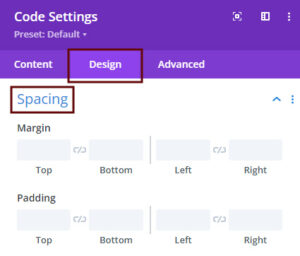
- In the ‘Code’ module, under the ‘Design’ tab, the margin and padding around the calendar can be edited in the ‘spacing’ toggle group.